XreplyAI
Show up everywhere. Post to 15 platforms, one calendar.


## Overview
XreplyAI is built for solo founders, indie hackers, consultants, and B2B creators who know that consistent social presence drives inbound leads — but don't have hours a day to spend on it.
The scheduler is the core: one calendar plans, previews, and publishes to every connected platform, so being consistently present costs minutes a week instead of hours. On top of that, XreplyAI can generate posts and replies in a voice trained on your own archive — so when you do automate the writing, it still sounds like you, not a generic AI template. Your audience never knows AI was involved. Voice is the supporting layer; the calendar is what you run your presence on.
It covers X, LinkedIn, Instagram, Threads, Facebook, YouTube, TikTok, Pinterest, Bluesky, Mastodon, Discord, Telegram, Tumblr, Google Business, and Slack from one dashboard.
## Key Features
**Voice Profile**
Upload your Twitter/X archive and XreplyAI analyzes 50–1,000+ of your own posts to build a personal voice model. It scores your writing across six dimensions — formality, expression, density, humor, assertiveness, and abstraction — and applies that profile to everything it generates. You can also upload LinkedIn, Instagram, or Threads exports as alternative voice sources.
**Content Planner**
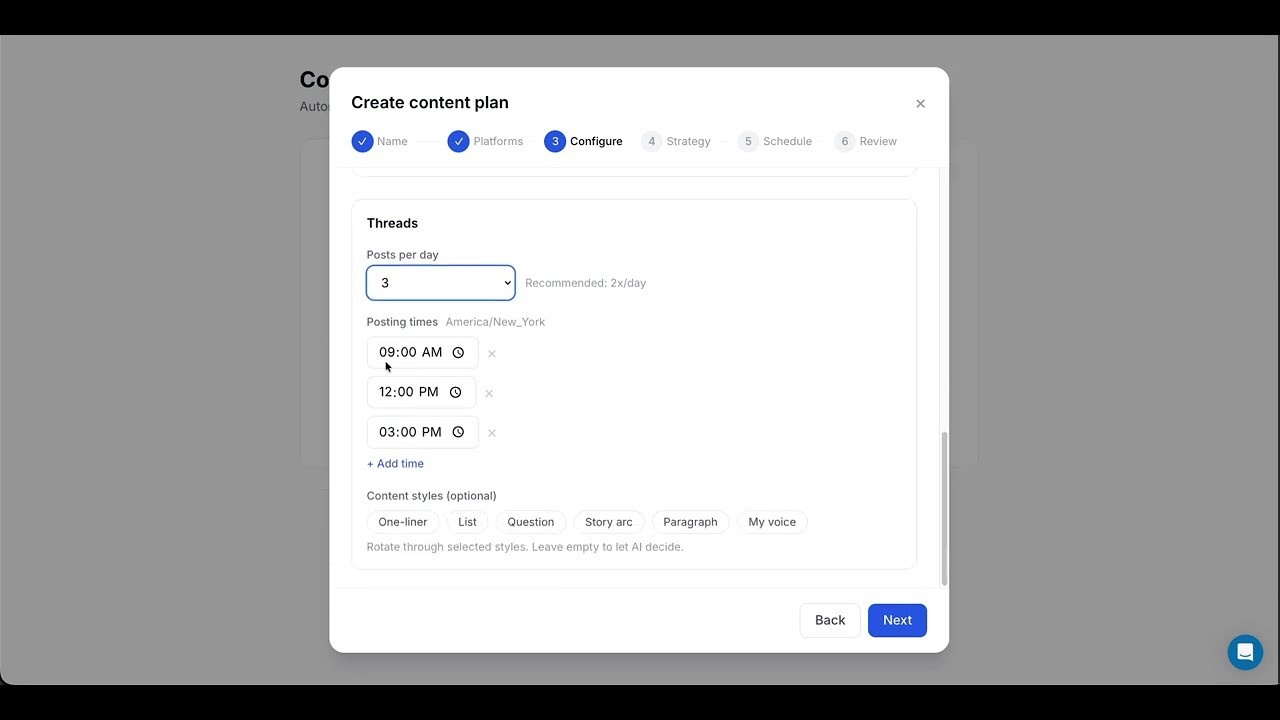
Set your topics, posting times, and content angles once. XreplyAI auto-generates posts on a rolling weekly schedule across all your connected platforms. Each week a fresh batch is created and queued for your review — you approve, edit, or skip. No blank page, no scrambling for ideas.
**Multi-Platform Composer**
Write once, adapt per platform, publish to 15 platforms from one place. Each platform gets its own content body with platform-native defaults (character limits, hashtag rules, CTA style). Expired-token platforms are skipped with a summary rather than blocking the whole post.
**AI Reply Generation**
A Chrome extension injects a reply button directly into X.com, LinkedIn, Instagram, and Reddit. Click it, get a reply in your voice. Thread and comment-aware, with tone and structure controls (one-liner, paragraph, question, list, story arc) and up to 5 regenerations per session.
**Batch Post Generation**
Generate 1–9 posts at once from a topic and angle. Three categories: Personalized (your voice), Trending (timely takes), Viral (high-engagement formats).
**Engagement Queue**
Capture tweets from X.com to reply to later. Draft replies in bulk. Statuses track from captured through to posted.
**Evergreen Recycling**
Mark any post evergreen and XreplyAI automatically re-queues your best performers — ranked by real impressions — into open posting-schedule slots after a per-account cooldown. Turn on "Refresh wording with AI" and each recycle is rewritten in your archive-trained voice, so it never posts verbatim. Paid plans.
**Recurring Posts**
Your best posts shouldn't publish once and disappear. Set an evergreen post to repeat every N days, on the weekdays you choose (even every other week), or on a day of the month — ending on a date or running indefinitely. The whole series lays out on your calendar as real posts, and you can cancel or edit a single occurrence, everything from one point forward, or the entire series. Paid plans.
**Auto DM Replies**
Send a customizable DM to every new follower automatically. Set your template once (with a {name} placeholder), and XreplyAI handles the rest. Pro and Team plans.
**MCP Server**
Create, schedule, and publish posts via Claude Code, Cursor, or any MCP-compatible AI client — without opening the dashboard.
**Teams**
Invite team members by email. Each connected social account belongs to a workspace and is shared with that workspace's members. Members can create and schedule posts across all of the workspace's connected accounts.
## Use Cases
- **Founders building in public** — stay visible in your niche without posting manually every day
- **Consultants and freelancers** — run a consistent reply strategy for inbound leads without burning out
- **B2B creators** — keep a presence across multiple platforms from one place, in one voice
- **Indie hackers** — ship and market simultaneously without splitting your focus
## Getting Started
1. Sign up at xreplyai.com — the Free plan needs no card
2. Connect your social accounts (X, LinkedIn, Instagram, Threads, Facebook, YouTube, TikTok, Pinterest, Bluesky, Mastodon, Discord, Telegram, Tumblr, Google Business, Slack), then pick a plan — a paid plan starts a 10-day trial, or stay on Free
3. Upload your Twitter archive to build your voice profile
4. Set up your Content Planner with your topics and posting schedule
5. Install the Chrome extension for AI reply generation on X, LinkedIn, Instagram, and Reddit
6. Review and approve your first batch of Content Planner posts from the review queue
Setup takes under 15 minutes.
## Pricing & Plans
| Plan | Price | AI | Replies | Channels |
|------|-------|----|---------|----------|
| Free | $0 | 10 lifetime AI generations | — | 3 (30 posts) |
| Starter | $11.99/mo ($9.99/mo annual) | Platform-provided | 20/day | 10 |
| Pro | $39.99/mo ($33.32/mo annual) | Platform-provided | 100/day | 20 |
| Team | $99.99/mo ($83.33/mo annual) | Platform-provided | 500/day | 50 |
10-day trial of the paid plan you pick. 17% discount on annual billing.
XreplyAI is built for solo founders, indie hackers, consultants, and B2B creators who know that consistent social presence drives inbound leads — but don't have hours a day to spend on it.
The scheduler is the core: one calendar plans, previews, and publishes to every connected platform, so being consistently present costs minutes a week instead of hours. On top of that, XreplyAI can generate posts and replies in a voice trained on your own archive — so when you do automate the writing, it still sounds like you, not a generic AI template. Your audience never knows AI was involved. Voice is the supporting layer; the calendar is what you run your presence on.
It covers X, LinkedIn, Instagram, Threads, Facebook, YouTube, TikTok, Pinterest, Bluesky, Mastodon, Discord, Telegram, Tumblr, Google Business, and Slack from one dashboard.
## Key Features
**Voice Profile**
Upload your Twitter/X archive and XreplyAI analyzes 50–1,000+ of your own posts to build a personal voice model. It scores your writing across six dimensions — formality, expression, density, humor, assertiveness, and abstraction — and applies that profile to everything it generates. You can also upload LinkedIn, Instagram, or Threads exports as alternative voice sources.
**Content Planner**
Set your topics, posting times, and content angles once. XreplyAI auto-generates posts on a rolling weekly schedule across all your connected platforms. Each week a fresh batch is created and queued for your review — you approve, edit, or skip. No blank page, no scrambling for ideas.
**Multi-Platform Composer**
Write once, adapt per platform, publish to 15 platforms from one place. Each platform gets its own content body with platform-native defaults (character limits, hashtag rules, CTA style). Expired-token platforms are skipped with a summary rather than blocking the whole post.
**AI Reply Generation**
A Chrome extension injects a reply button directly into X.com, LinkedIn, Instagram, and Reddit. Click it, get a reply in your voice. Thread and comment-aware, with tone and structure controls (one-liner, paragraph, question, list, story arc) and up to 5 regenerations per session.
**Batch Post Generation**
Generate 1–9 posts at once from a topic and angle. Three categories: Personalized (your voice), Trending (timely takes), Viral (high-engagement formats).
**Engagement Queue**
Capture tweets from X.com to reply to later. Draft replies in bulk. Statuses track from captured through to posted.
**Evergreen Recycling**
Mark any post evergreen and XreplyAI automatically re-queues your best performers — ranked by real impressions — into open posting-schedule slots after a per-account cooldown. Turn on "Refresh wording with AI" and each recycle is rewritten in your archive-trained voice, so it never posts verbatim. Paid plans.
**Recurring Posts**
Your best posts shouldn't publish once and disappear. Set an evergreen post to repeat every N days, on the weekdays you choose (even every other week), or on a day of the month — ending on a date or running indefinitely. The whole series lays out on your calendar as real posts, and you can cancel or edit a single occurrence, everything from one point forward, or the entire series. Paid plans.
**Auto DM Replies**
Send a customizable DM to every new follower automatically. Set your template once (with a {name} placeholder), and XreplyAI handles the rest. Pro and Team plans.
**MCP Server**
Create, schedule, and publish posts via Claude Code, Cursor, or any MCP-compatible AI client — without opening the dashboard.
**Teams**
Invite team members by email. Each connected social account belongs to a workspace and is shared with that workspace's members. Members can create and schedule posts across all of the workspace's connected accounts.
## Use Cases
- **Founders building in public** — stay visible in your niche without posting manually every day
- **Consultants and freelancers** — run a consistent reply strategy for inbound leads without burning out
- **B2B creators** — keep a presence across multiple platforms from one place, in one voice
- **Indie hackers** — ship and market simultaneously without splitting your focus
## Getting Started
1. Sign up at xreplyai.com — the Free plan needs no card
2. Connect your social accounts (X, LinkedIn, Instagram, Threads, Facebook, YouTube, TikTok, Pinterest, Bluesky, Mastodon, Discord, Telegram, Tumblr, Google Business, Slack), then pick a plan — a paid plan starts a 10-day trial, or stay on Free
3. Upload your Twitter archive to build your voice profile
4. Set up your Content Planner with your topics and posting schedule
5. Install the Chrome extension for AI reply generation on X, LinkedIn, Instagram, and Reddit
6. Review and approve your first batch of Content Planner posts from the review queue
Setup takes under 15 minutes.
## Pricing & Plans
| Plan | Price | AI | Replies | Channels |
|------|-------|----|---------|----------|
| Free | $0 | 10 lifetime AI generations | — | 3 (30 posts) |
| Starter | $11.99/mo ($9.99/mo annual) | Platform-provided | 20/day | 10 |
| Pro | $39.99/mo ($33.32/mo annual) | Platform-provided | 100/day | 20 |
| Team | $99.99/mo ($83.33/mo annual) | Platform-provided | 500/day | 50 |
10-day trial of the paid plan you pick. 17% discount on annual billing.