DeepCleanMac Review: A Mac Cleaner That Goes Deeper Than CleanMyMac
DeepCleanMac found 38GB of forgotten render files on my 512GB MacBook Pro
Maulik Dhameliya
LaunchIgniter Score
Great
DeepCleanMac
Pros
- 120+ scan categories with deep creative app coverage (Adobe, Final Cut, DaVinci, Capture One)
- Native SwiftUI app - fast launch, minimal resource usage
- Skip-when-running detection won't touch caches of apps you're working in
- Duplicate finder catches re-imported SD cards and copied project files
- Disk analyzer helps track down forgotten exports and render files
- Runs entirely offline with no cloud dependencies
- Secure shredder with honest disclosure about APFS limitations
- Multi-source app updater (App Store, Sparkle, Homebrew)
Cons
- No scheduled or automated cleaning
- Requires macOS 14.0 Sonoma or later
- No scan history or visual reports
- No iCloud storage analysis
- APFS limits secure shredding effectiveness (though the app discloses this)
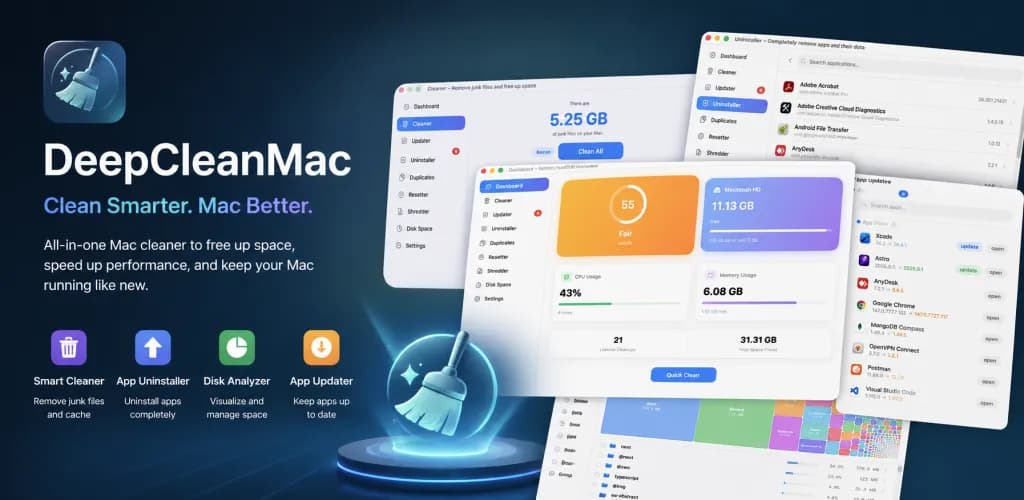
If you shoot photos or edit video on a Mac, you know the drill. You finish a project, export the final cut, deliver to the client, and move on. But sitting on your drive are gigabytes of render files, proxy media, thumbnail caches, and old Lightroom previews that you'll never touch again. Multiply that across a few dozen projects and suddenly your 512GB SSD is screaming at you.
I've tried most Mac cleaners over the years. CleanMyMac X, OnyX, random shell scripts I found on Reddit. They all clean browser caches and system logs just fine, but none of them really understood creative app storage. When I first ran DeepCleanMac, it immediately found Final Cut Pro render files, DaVinci Resolve cache data, Adobe media caches, and Lightroom preview folders. That got my attention.
After using it daily for about three weeks, it's earned a permanent spot in my dock. Let me walk you through what it does and where it falls short.
What You're Getting
DeepCleanMac is a native macOS app built in SwiftUI. Not Electron, not a web wrapper - an actual Mac app that launches in under a second and barely touches your system resources. It bundles ten tools: a system cleaner, duplicate finder, app uninstaller, app resetter, secure shredder, disk analyzer, startup manager, app updater, a live system dashboard, and settings. Runs on macOS Sonoma (14.0) or later, supports Apple Silicon and Intel, and the whole app is about 15MB.
For context, CleanMyMac X is over 100MB. When you're already fighting for every gigabyte of SSD space, a lightweight cleaner matters.
The Cleaner: Where It Earns Its Keep
Most Mac cleaners hit maybe 40-50 categories of junk. The usual stuff - system caches, browser data, temp files. DeepCleanMac scans over 120 categories, and the ones that matter for creative professionals are scattered across several sections.
The creative app coverage is deep. Final Cut Pro render files and proxy media. DaVinci Resolve cache data. Adobe suite caches across Photoshop, Lightroom, Premiere Pro, After Effects, Illustrator, and more. Sketch temp files. Figma desktop caches. Spotify and Apple Music caches eating space you didn't know about.
Media and communication apps get proper treatment too. Zoom recordings you forgot to delete, Slack cached files from months of client conversations, Discord and Teams caches, Telegram media downloads. These add up fast when you're sharing large preview files with clients all day.
Browser cleanup covers 18 browsers. Safari, Chrome (including per-profile caches), Firefox, Arc, Brave, Edge, and a dozen others. If you're uploading dailies to Frame.io or reviewing client galleries in the browser, those cached files stick around longer than you'd think.
I ran my first scan after finishing a wedding edit. DeepCleanMac found 38GB of reclaimable space. A huge chunk was Final Cut render files from three projects ago and Adobe media cache that Premiere keeps hoarding. On a 512GB drive, that's space for an entire shoot's worth of RAW files.
The system and user sections clean up the rest - macOS caches, crash logs, old installer files, Mail downloads, QuickLook thumbnails (these get surprisingly large if you preview a lot of images in Finder), and saved application state. There are also categories for cloud storage caches from Dropbox, Google Drive, and OneDrive, which is relevant if you sync client folders.
Smart Enough Not to Break Things
Here's what matters for a working creative: DeepCleanMac won't mess up an active project.
It detects running applications and skips their caches. If Final Cut Pro is open, it won't touch Final Cut's files. Same for Premiere, DaVinci Resolve, Photoshop, Chrome, Safari - anything that could crash or corrupt data if you pull files out from under it. I tested this mid-render and it correctly flagged those categories as skipped.
Different file types get different age thresholds. Crash reports older than 7 days get flagged. Saved application state only after 30 days. Installer packages after 14 days. It's not blindly deleting everything it finds.
System-critical caches are protected. Finder, Spotlight, CoreAudio, Dock - these are whitelisted. I've seen other cleaners wipe Spotlight's index and then you're sitting there for 20 minutes waiting for it to rebuild while you can't search for anything.
You preview everything before it's gone. Every scan shows exactly what will be deleted and how much space you'll recover. Nothing happens until you confirm. For someone who's accidentally deleted a Premiere project file before (guilty), this matters.
The Duplicate Finder is Built for Large File Libraries
This is where photographers will pay attention. The duplicate finder uses content-hash comparison, but it's smart about it - it only computes hashes for files that share the same file size first, which keeps things fast even with large libraries. My home folder with around 500K files scanned in about 2-3 minutes.
If you've ever imported the same SD card twice, or copied a folder of selects to multiple locations during a project, or have the same headshot saved in three client folders, the duplicate finder will catch it. Results are grouped by duplicate sets with file sizes shown, and you choose whether to keep the newest or oldest copy. There's a 4KB minimum threshold so it skips tiny config files, and it automatically excludes hidden files and package contents to avoid false positives.
It's not going to replace a dedicated photo management tool for culling similar-but-not-identical images. But for catching genuine byte-for-byte duplicates across your drive, it works well.
The Uninstaller Catches What Trash Misses
Every creative professional has a graveyard of apps they tried once and dragged to Trash. That trial version of Capture One. The color grading plugin that didn't work out. The old version of Affinity Photo you replaced. Dragging to Trash leaves behind preferences, caches, containers, logs, and support files scattered across your Library folders.
DeepCleanMac's uninstaller finds associated files across nine categories and labels each with a risk level - Safe, Caution, or Risky. System apps like Finder and Safari are protected and can't be touched. And everything goes to Trash (not permanent deletion) via macOS's own API, so you can recover if something goes wrong.
The App Resetter is a related feature I've used more than expected. When Lightroom started acting sluggish after an update, I reset it to factory defaults instead of doing a full uninstall/reinstall. Fixed the issue and kept my catalog untouched.
Disk Analyzer: Find the Forgotten Exports
The built-in disk analyzer shows a treemap visualization of your storage. Navigate through folders, spot the largest files, and reveal them in Finder or delete directly. This is how I found a 22GB ProRes export from a project I delivered six months ago, still sitting in my exports folder.
It's not as polished as DaisyDisk for visualization, but having it built into the same app means I use it. It's especially handy after wrapping a project to find all the scattered output files, proxy media, and temp renders that didn't get cleaned up.
Secure Shredder: A Note on Client Confidentiality
For photographers and videographers handling client work - especially corporate, legal, or medical content - the secure shredder adds a layer of documented file destruction. It overwrites files with multiple passes per DOD 5220.22-M standards.
DeepCleanMac is upfront about one important caveat: APFS copy-on-write means old data blocks might still exist on disk even after overwriting. Most competitors ignore this or hide it. DeepCleanMac puts the warning right in your face. For true data destruction on modern SSDs, full-disk encryption and a secure erase is still the gold standard, but for documented "we deleted the files" procedures, the shredder does its job.
Dashboard and Startup Manager
The dashboard shows real-time system stats - CPU usage, memory breakdown, disk space (including purgeable capacity), temperature, network speeds, battery, and uptime. There's a health score from 0-100 that gives you a quick read on whether something needs attention.
For creatives, the most useful part is the disk space display. It uses Apple's proper API to show available capacity including purgeable space, which gives you a more accurate picture of how much room you have before your next import.
The startup manager lets you toggle login items and background services on and off. If your Mac is booting slowly because five creative apps all want to launch at login, you can trim that list without digging through System Settings.
App Updater
The updater checks three sources: Mac App Store, Sparkle feeds (for apps distributed directly like Capture One or DaVinci Resolve), and Homebrew. You see version numbers, release notes, and dates. Having all three in one place beats checking each app individually, especially when you're running a dozen creative tools that all update on their own schedules.
What's Missing
No scheduled cleaning. I'd love to set it to run a scan every Sunday night and clean up project leftovers automatically. For a tool this thorough, that's a noticeable gap.
It requires macOS 14.0 (Sonoma) or later. If you're still on Ventura because a critical plugin doesn't support Sonoma yet, you're out of luck.
No scan history or visual reports. I'd like to see how much space I've recovered over time, or a log of past scans. The dashboard tracks lifetime totals, but detailed history would be better.
No iCloud storage analysis. For photographers using iCloud Photo Library or syncing project folders to iCloud Drive, seeing cloud storage usage from the same app would be a natural fit.
How It Compares
Feature | DeepCleanMac | CleanMyMac X | OnyX | AppCleaner |
|---|---|---|---|---|
Scan Categories | 120+ | ~50 | ~20 | Uninstall only |
Native SwiftUI | Yes | No (AppKit) | Yes | Yes |
Creative App Cleaning | Deep (Adobe, FCP, DaVinci, etc.) | Basic | No | No |
Duplicate Finder | Yes | Yes | No | No |
App Uninstaller | Yes | Yes | No | Yes |
Secure Shredder | Yes | Yes | No | No |
Disk Analyzer | Yes | Yes | No | No |
App Updater | Yes | Yes | No | No |
Skip-When-Running | Yes | Partial | No | N/A |
Price | $19/yr or $39 lifetime | $39.95/yr | Free | Free |
CleanMyMac X is a solid app and the most direct competitor. But its creative app coverage is basic - it'll clean general caches but doesn't go deep on render files, proxy media, or per-application media caches the way DeepCleanMac does. If you just need general Mac maintenance, CleanMyMac is fine. If your storage problems are driven by creative work, DeepCleanMac understands the specifics better.
Who Should Get This
Photographers and video editors working off a MacBook with 256GB or 512GB of storage will get the most out of this. The space it recovers from render caches, media previews, and forgotten exports pays for itself immediately.
Anyone running multiple creative apps - Adobe suite, Final Cut, DaVinci Resolve, Capture One, Affinity - will find the cross-application cleanup is a real time saver. These apps all cache aggressively and none of them clean up after themselves.
Client confidentiality matters in creative work, and the local-only scanning (no cloud, no telemetry) and secure shredder add peace of mind. The app is signed and notarized by Apple, and license credentials live in the macOS Keychain.
That said, hobbyist photographers who shoot 200 photos a year and never edit video can probably get by with AppCleaner for free. But if your Mac is a production tool and storage is always tight, DeepCleanMac is worth it.
Licensing
Two options through Polar: a lifetime license (one-time purchase) or a 1-year subscription. You can deactivate and move your license between machines. There's an offline grace period so it won't lock you out on a shoot with no WiFi.
Specifications
| Current Version | 1.5.1 |
| Platform | macOS 14.0 (Sonoma) or later |
| Architecture | Universal (Apple Silicon + Intel) |
| UI Framework | Native SwiftUI |
| App Category | Utilities |
| Bundle Size | ~5MB |
| License Options | Lifetime or 1-Year |
| Scan Categories | 120+ |
| Supported Browsers | 18 |
| Creative App Categories | 70+ |
Verdict
DeepCleanMac is the most thorough Mac cleaner I've used, and the first one that understands creative workflows. It doesn't just clean browser caches and system logs - it goes after the render files, proxy media, preview caches, and media junk that creative apps pile up without telling you.
The native SwiftUI performance means it's fast and light, which matters when you're already running Premiere and After Effects and don't need another app eating your RAM. The skip-when-running protection means you won't accidentally break an active project. And the duplicate finder, disk analyzer, and uninstaller round it out into a proper all-in-one storage tool.
The missing scheduled cleaning and lack of scan history keep it from a 9. But the core cleaning engine is the best I've tested, and for anyone working with large media files on a Mac, recovering 30-40GB of wasted space makes a real difference.