PeptiLab Peptide Calculator Review: Fast, Clear mg to mL and Syringe Unit Conversions
A free, no-sign-up reconstitution calculator that turns vial size and solvent volume into concentration, mL and U-100 units, and shows every step of the math
Maulik Dhameliya
LaunchIgniter Score
Great
PeptiLab Peptide Calculator
Pros
- Free, with no sign-up, no email gate and no paywall on the calculator itself
- Answers in one line: concentration, volume in mL, U-100 syringe units and aliquots per vial at the same time
- A visual syringe bar and a "How this was calculated" panel make the math easy to check
- A full table for six common amounts, from 100 mcg to 5 mg, so you rarely have to type anything
- One-tap vial presets, including blends like KLOW (80 mg) and Glow (70 mg) that use the total mass
- Warns you when a volume falls under one unit, which is too small to measure accurately
- Clear explainers on mg, mcg, mL and units, plus worked examples and handling notes
- Says plainly that it's a unit converter, not a dosage tool, and gives no protocols
Cons
- An age and "qualified researcher" gate shows up before you can use a free calculator
- Vial presets only cover PeptiLab's own products
- U-100 units only, with no U-40/U-50 scale or microlitre (µL) output for pipettes
- Works in one direction only: you can't enter a volume and get back the mass it holds
- The bacteriostatic water upsell and discount pop-up sit right in the middle of the tool
PeptiLab's peptide calculator is a free web tool that converts the mg in a vial and the mL of solvent you add into concentration, volume and U-100 syringe units. It's built by a Canadian research-peptide supplier for preparing laboratory stock solutions, and it doesn't need an account.
Reconstitution math is simple on paper. Divide the mass in the vial by the volume of solvent to get the concentration, then divide the amount you need by that concentration to get a volume. In practice, it's where mistakes happen. Labels are in mg, the amounts people work with are often in mcg, and syringes are marked in units rather than mL. Moving between three units by hand is how a 0.05 mL aliquot turns into 0.5 mL.
Most free peptide calculators online are a few bare input boxes on an ad-heavy page, and many of them blur the line between converting units and telling you how much to use. PeptiLab's calculator takes a cleaner approach. It shows its working, explains every unit, and is clear that it's a conversion tool and nothing more. I tested it with a range of vial sizes, solvent volumes and amounts, and checked the results by hand.
What Is the PeptiLab Peptide Calculator?
It's a free reconstitution calculator that turns three inputs into every number you need to measure a stock solution accurately. You enter:
Peptide in vial: the mg printed on the label, with quick buttons for 5, 10, 20, 50 and 100 mg.
Solvent added: the bacteriostatic or sterile water you put in the vial, with buttons for 1, 2, 3, 5 and 10 mL.
Amount needed: the mass in one aliquot, in mg or mcg, with buttons from 100 mcg to 5 mg.
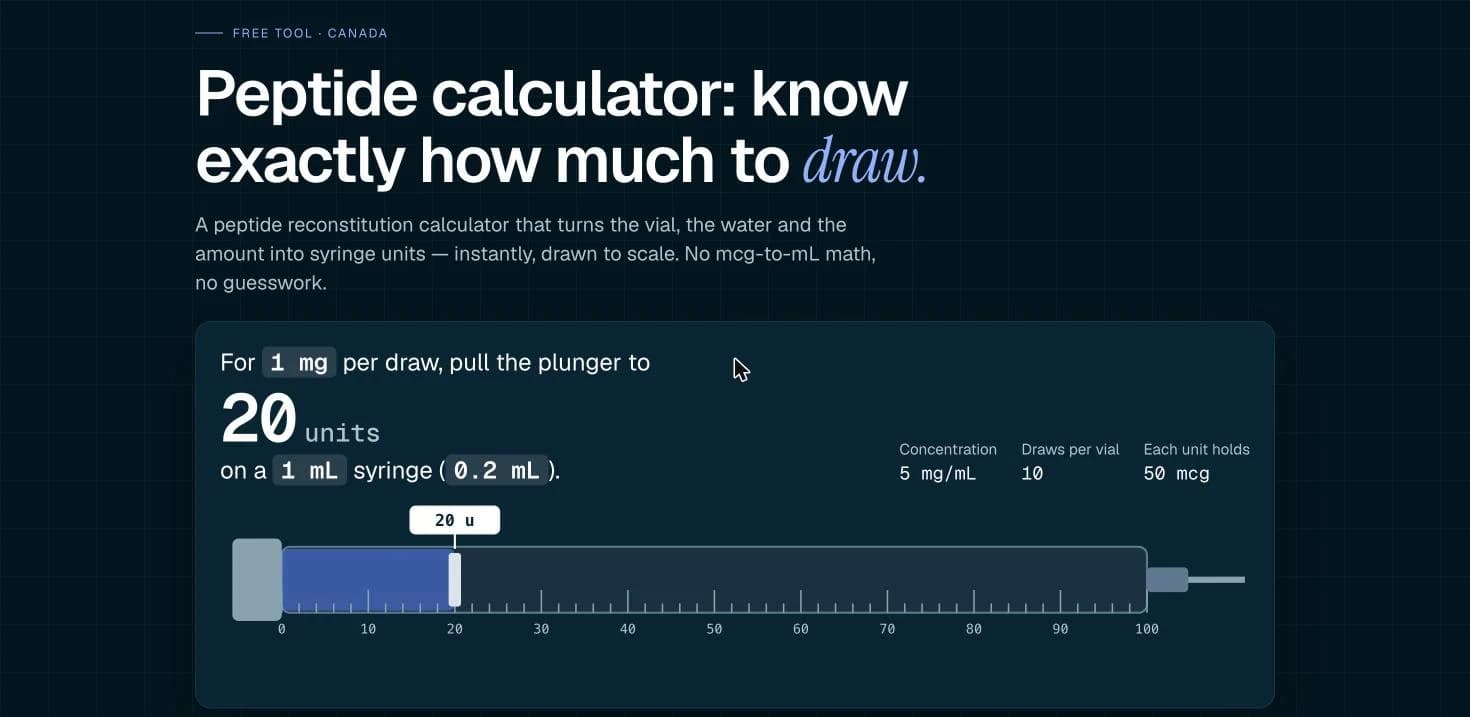
The result reads like a sentence: "At 5 mg/mL, 1 mg is 0.2 mL (20 units)." Next to it you get the concentration, the mass per syringe unit (50 mcg here) and how many aliquots of that size the vial holds (10). It's the most readable way of showing this result I've seen.

Quick Inputs That Cover Most Cases
The input panel is built for speed. Each field has preset buttons for the most common values and a free-entry box for anything else, and the amount field switches between mg and mcg with one tap. Most calculations take three clicks.

Each field also has a one-line explanation under it ("The mg printed on the vial label," "The mass of peptide in one aliquot"), which is enough to stop the most common mistake: entering the amount you want in the vial field, or the other way round.
Below the inputs is the main upsell, a banner offering PeptiLab's own bacteriostatic water at $5 for 10 mL and $10 for 30 mL. It's reasonably priced and relevant, but it does break up the tool.
The Visual Syringe Bar and "Show Your Work"
Two small features make this calculator easier to trust than most.
The first is the syringe bar. It fills to the volume you need on a 0 to 2 mL scale, so you can see at a glance whether you're drawing a tenth of a mL or most of a syringe. It catches an order-of-magnitude error much faster than a number does.
The second is the "How this was calculated" panel, which shows the formulas with your numbers in them. Under the table, the formulas are also written out in full: concentration = mg in vial ÷ mL of solvent, volume = amount ÷ concentration, and 1 mL = 100 units. Results are rounded to three decimal places, and there's a "Copy results" button for lab notes.
I checked a handful of combinations by hand, including 10 mg in 2 mL, 50 mg in 5 mL and the 80 mg KLOW blend in 4 mL, and every result matched.
Vial Presets and the Amount Table
Under the calculator is a row of vial presets for PeptiLab's catalogue: BPC-157, TB-500, a BPC/TB blend, GHK copper peptide, KLOW, Glow, KPV, Ipamorelin, Epitalon, MOTS-c and a 500 mg NAD+ vial. Tapping one sets the vial size and leaves your solvent and amount alone.

The amount table is the feature I used most. For whatever vial and solvent you've entered, it lists the volume, U-100 units and aliquots per vial for 100 mcg, 250 mcg, 500 mcg, 1 mg, 2 mg and 5 mg at the same time. If you're setting up several aliquot sizes from one stock solution, this saves you running the calculator six times.
The presets are the obvious limitation. They only cover PeptiLab's own products. That's understandable from a store, but if you're working with a vial from somewhere else, you'll type the mass in yourself. That only takes a second, and the calculator works the same either way.
It Explains the Units, Not Just the Answer
The content below the tool is better than it needs to be. The most useful section answers the question everyone asks first: how much water should I add? The honest answer is that there isn't one. Adding solvent doesn't change how much peptide is in the vial, only how concentrated it is. 10 mg in 1 mL is 10 mg/mL, and 10 mg in 2 mL is 5 mg/mL.
The page then gives a practical rule: pick a concentration that puts a typical aliquot between about 5 and 50 units, where standard lab syringes and pipettes are accurate. The calculator backs this up by flagging any volume under 1 unit and suggesting you add more solvent.

A short glossary covers mg, mcg (µg), mL, units and mg/mL, each with an example, and a worked examples table shows five common setups, from 5 mg in 1 mL to 80 mg in 4 mL, with the volume for 250 mcg and 1 mg.

The handling notes are practical too: check the batch number against the Certificate of Analysis so the mass you enter matches the tested lot, add solvent slowly down the side of the vial without shaking, write the concentration and date on the vial, and keep it refrigerated and out of the light.
A Converter, Not a Dosage Tool
This is the part I appreciated most. The page says clearly, in several places, that this is a unit-conversion tool for preparing laboratory stock solutions. It doesn't suggest amounts, confirm that any amount is appropriate or provide protocols, and PeptiLab sells its compounds for research use only.
That matters because a lot of peptide calculators online drift into dosing advice. PeptiLab doesn't. The FAQ answers "Is this a peptide dosage calculator?" with a straight no. You put in a mass and get back a volume, and that's all it does.
It's worth being clear about the context. Research peptides like these aren't approved for human use in Canada, and the site has an age and "qualified researcher" confirmation before you can use it. The calculator is useful for anyone who needs to convert mg, mL and syringe units, but it isn't medical guidance and doesn't claim to be. If you're comparing other free tools, browse the rest of our software reviews.
What's Missing
A reverse mode. You can only go from an amount to a volume. There's no way to enter a volume, like 15 units, and see how much mass it holds, which would be handy when checking existing notes.
Other syringe scales. Everything is in U-100 units. There's no U-40 or U-50 option, and no µL output, which would suit lab pipettes better than syringe units.
Presets for other vials. The one-tap presets only cover PeptiLab's products. A short list of common vial sizes from any source, or a way to save your own, would make it more useful.
Saved calculations. There's a copy button but no way to save or share a setup with a link, so you start again each visit.
A cleaner page. You have to get past an age gate first, and a 20% discount pop-up and a BAC water banner sit around the tool. None of it gets in the way of the math, but the page feels more like a shop than a utility. There's also a small typo in the FAQ, which gives the target range as "50–50 units" where the guide above it says 5 to 50.
How It Compares
Feature | Doing it by hand | Typical free peptide calculators | PeptiLab calculator |
|---|---|---|---|
Output | Whatever you work out | Usually units only | mg/mL, mcg per unit, mL, units, aliquots |
Shows its working | Yes, on paper | Rarely | Yes, plus a visual syringe bar |
Multiple amounts at once | No | Rarely | Yes, six-row table |
Small-volume warning | No | Rarely | Yes, under 1 unit |
Blend support | Yes | Varies | Yes, by total mass |
Dosing suggestions | None | Often | None, by design |
Syringe scales | Any | Sometimes U-40/U-50 | U-100 only |
Cost | Free | Free, often with ads | Free, no ads, store upsells |
The math is the same everywhere. What sets PeptiLab's version apart is that it's harder to misread: one clear sentence, a visual bar, a table for common amounts and a warning when a volume gets too small.
Who Should Use This
Researchers and lab staff preparing stock solutions who want concentration, volume and units in one place, with the working shown.
Students and anyone learning reconstitution math. The glossary, worked examples and "how much water" explainer are a good, short introduction to mg, mcg, mL and units.
PeptiLab customers, who get one-tap presets for every vial in the catalogue, including the blends.
If you need U-40 syringes, µL output or a reverse calculation, you'll need something else. For straightforward mg to mL and U-100 conversions, this is one of the cleanest free options around. Try the PeptiLab peptide calculator.
How Much Does It Cost?
Calculator: free, with no account or email needed.
Ads: none, though the page promotes PeptiLab's bacteriostatic water and a 20% first-order code.
Bacteriostatic water (optional): $5 for 10 mL or $10 for 30 mL, made in Ontario.
PeptiLab Peptide Calculator FAQ
What does the PeptiLab peptide calculator do?
It converts the mass of peptide in a vial (mg) and the volume of solvent added (mL) into a concentration in mg/mL, then tells you the volume in mL and U-100 syringe units that holds a given amount, plus how many aliquots of that size the vial contains.
Is the PeptiLab peptide calculator free?
Yes. It's free and needs no sign-up. You have to confirm the site's age and research-use disclaimer before the page opens.
How many syringe units are in 1 mL?
On a U-100 syringe, 100 units equals 1 mL, so 1 unit is 0.01 mL and 20 units is 0.2 mL. The calculator does this conversion for you.
What's the difference between mg and mcg?
A milligram (mg) is one thousandth of a gram, and a microgram (mcg or µg) is one thousandth of a milligram. So 1 mg = 1,000 mcg, and 250 mcg = 0.25 mg. Vials are usually labelled in mg, while smaller amounts are often written in mcg.
How much bacteriostatic water should I add to a vial?
There's no single answer. More solvent gives a lower concentration and a larger, easier-to-measure volume for the same mass. PeptiLab suggests trying 1, 2 or 3 mL in the calculator and choosing the volume that puts your aliquots in a range your equipment measures accurately, roughly 5 to 50 units.
Does it work for peptide blends?
Yes. Enter the total peptide mass on the label, such as 80 mg for KLOW or 70 mg for Glow, and the result is the concentration of the combined blend.
Is this a peptide dosage calculator?
No. It's a unit-conversion tool for preparing stock solutions. It doesn't suggest amounts, confirm that any amount is appropriate or provide protocols, and PeptiLab's compounds are sold for laboratory research use only.

Specifications
| Product Type | Free web calculator (reconstitution and unit conversion) |
| Made By | PeptiLab, a research-peptide supplier in Ottawa, Canada |
| Inputs | Peptide in vial (mg), solvent added (mL), amount needed (mg or mcg) |
| Outputs | Concentration (mg/mL), mcg per unit, volume (mL), U-100 units, aliquots per vial |
| Quick Table | 100 mcg, 250 mcg, 500 mcg, 1 mg, 2 mg, 5 mg |
| Vial Presets | 11 PeptiLab products, from 10 mg vials to a 500 mg NAD+ vial |
| Blend Support | Yes, using the total mass on the label |
| Precision | Rounded to three decimal places; flags volumes under 1 unit |
| Syringe Scale | U-100 only (100 units = 1 mL) |
| Sign-up | None (age confirmation required) |
| Pricing | Free |
Verdict
PeptiLab's peptide calculator does one thing and does it well. You enter what's in the vial, how much solvent you added and the amount you need, and it gives you the concentration, the volume in mL and the U-100 units straight away, plus how many aliquots the vial holds. The math isn't hard, but this is the kind of conversion where a slipped decimal costs you a whole vial, and the tool makes that very hard to get wrong.
What lifts it above most peptide calculators is how much it explains. There's a visual syringe bar, a "How this was calculated" panel, a full table for common amounts, a warning when a volume is too small to measure, and a short, clear explanation of why there's no single right amount of water. It's also honest about its limits: it's a unit converter for lab stock solutions, and it won't suggest amounts or protocols.
The downsides are small. The age gate is annoying for a free calculator, the presets only cover PeptiLab's own catalogue, and U-100 is the only scale. None of that stops it from being one of the cleanest reconstitution calculators I've used, so it gets an 8.3.